
Prerequisites
Basic use of computers, files, and office applications. The non-technical track does not require programming. The technical track is for learners who can read and edit code.
Work with AI like an engineer at Big Tech.
The main goal is to use AI to complete work and achieve measurable productivity gains. Learners work with documents, tabular data, workplace information, and AI coding tools to create useful applications. Both technical and non-technical learners practice defining requirements, directing AI, testing results, finding errors, and refining outputs.
Basic use of computers, files, and office applications. The non-technical track does not require programming. The technical track is for learners who can read and edit code.
Learners can identify tasks suitable for AI, collaborate and delegate at different levels of autonomy, build utilities with AI coding, configure an agent team on a provided framework, run goal-driven workflows within defined boundaries, evaluate results, and select the most useful autonomy level for each task.
Technical and non-technical professionals, including product managers, business analysts, operations staff, marketers, knowledge workers, and developers.
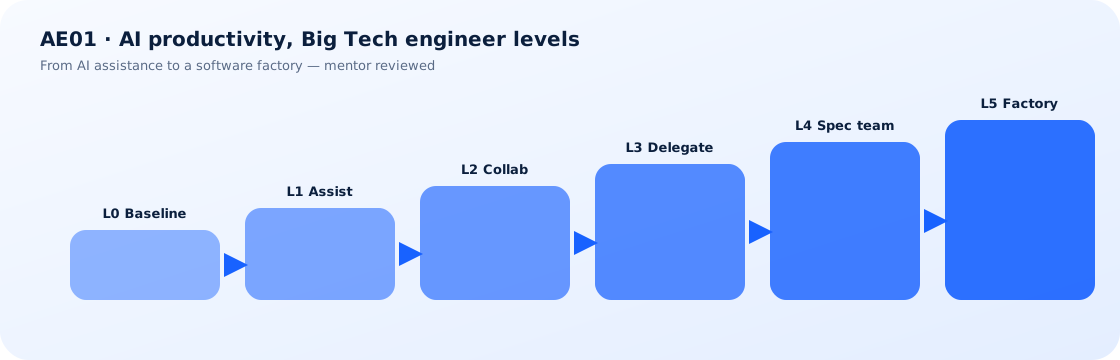
Progress from L0 to L5 through personal assistance, collaboration, delegation, orchestration, and AI workflow operations.
| Level | Learner role and new capability | Non-technical track | Technical track |
|---|---|---|---|
| L0: Baseline | Understand the current workflow and select a suitable problem | Describe an office task and save an example of the expected result | Describe a coding or data task and save a baseline |
| L1: AI Assistance | Use AI for small tasks and verify every output | Rewrite part of a report or spreadsheet formula | Review a small code suggestion |
| L2: AI Collaboration | Provide context, discuss requirements, and refine results through checkpoints | Build a report or dashboard with AI and sample data | Build a small utility with a coding assistant |
| L3: Task Delegation | Delegate a complete task and evaluate the resulting artifact | Process a batch of files and receive a reconciliation report | Delegate a small issue and receive code changes, tests, and a summary |
| L4: Spec-Driven AI Team | Write acceptance criteria, configure roles and handoffs, and review plans and results | Ask agents to build a utility from business requirements, then verify it and deliver instructions | Give agents a specification, request implementation and tests, and review the work in an isolated workspace |
| L5: Software Factory Lab | Configure a workflow that accepts goals, implements, tests, packages, and handles exceptions | Use a new business specification to trigger creation or revision of an office utility and validate it with business examples | Use a new specification to trigger a pipeline that creates or updates a tool, runs acceptance tests, and packages a qualified build in a sandbox |
| Week | First session | Second session |
|---|---|---|
| 1 | S1, L0: Select a work task, record a baseline, and define completion criteria | S2, L1: Activate accounts, use AI suggestions for small tasks, and check for errors |
| 2 | S3, L2: Provide requirements, context, and examples, then build a checkpoint-based collaboration workflow | S4, L2: Use AI coding to build a small document or data utility and understand its inputs and outputs |
| 3 | S5, L2: Debug with AI, run business tests, save versions, and complete the collaboration milestone | S6, L3: Turn requirements into a delegable task with defined artifacts and acceptance criteria |
| 4 | S7, L3: Build a custom harness with instructions, context, skills or templates, tools, and tests | S8, L3: Let an agent complete an independent task in an isolated workspace and collect artifacts and logs |
| 5 | S9, L3: Review the result, test missing-data cases, revise the configuration, and run it again | S10, L4: Write acceptance criteria and configure an agent team, handoff contracts, and workspaces |
| 6 | S11, L4: Review the plan and ask the agent team to implement the specification within defined boundaries | S12, L4: Verify results independently, compare them with a single agent, and complete the spec-driven orchestration milestone |
| 7 | S13, L5: Configure a software factory from a template to accept specifications, build or update utilities, test them, and package results | S14, L5: Run a new requirement end to end with permission limits, budget limits, and failure cases |
| 8 | S15, L5: Audit autonomy, review time, quality, cost, and productivity trade-offs | S16, L5: Complete an unguided capstone run, defend the evidence, and select a practical adoption level |
Learners receive a suitable paid AI seat for two months, a workspace for running utilities, templates, and setup support. Labs that require APIs have a separate budget. The selected account must support all features used in class.
L4 and L5 also require a prepared orchestration environment, simulated triggers and backlogs, enough quota for multiple agents, logs, and independent tests. The complete L0 to L5 journey must pass a pilot before it is advertised. Non-technical learners receive configuration interfaces and sample data. Technical learners receive a sample repository for deeper practice.
The program may use Claude Code for coding, Cowork for document tasks, or equivalent tools validated during the pilot. Each cohort uses one primary toolset to maximize practice time. Instructors verify interfaces, access, and recipes before the module begins, while keeping core skills stable as tools change.
Utilities, harnesses, orchestration logs, an L0 to L5 record, and a productivity report.